Command line functionality#
viASP provides command-line functionality to create visualizations. It acts as a proxy to the clingo command, meaning that it is usually sufficient to replace clingo with viasp:
$ clingo encoding.lp -n0
$ viasp encoding.lp -n0
You can now inspect the visualization at http://localhost:8050/. To stop the server, press CTRL+C.
The basic command line usage is described below. All options can be found by running
$ viasp --help
Tip
To speed up viasp’s startup time, run the viasp_server command in the background. This way, subsequent calls to viasp will be faster as the startup process is already completed. For proper shutdown, ensure to terminate the process when done.
Loading Programs#
Loading from files#
Consider the file hamiltonian.lp
node(1..4). start(1).
edge(1,2). edge(2,3). edge(2,4). edge(3,1).
edge(3,4). edge(4,1). edge(4,3).

{ hc(V,U) } :- edge(V,U).
reached(V)  :- hc(S,V), start(S).
reached(V)  :- reached(U), hc(U,V).
:- node(V), not reached(V).
:- hc(V,U), hc(V,W), U!=W.
:- hc(U,V), hc(W,V), U!=W.
To load the program, pass the path to the file as an argument.
$ viasp hamiltonian.lp
For programs split into multiple files, all of them can be loaded at once.
$ viasp hamiltonian.lp model1.lp
The output looks like the familiar clingo output, extended by some information about the viASP status.
viasp version 2.0.0rc2
Reading from hamiltonian.lp
Answer:
node(1) node(2) node(3) node(4) edge(1,2) edge(2,3) edge(2,4) edge(3,1) edge(3,4) edge(4,1) edge(4,3) hc(1,2) hc(2,3) hc(3,4) hc(4,1) start(1) reached(2) reached(3) reached(4) reached(1)
SAT
SATISFIABLE

viASP is running at: http://127.0.0.1:8050
Press Ctrl+C to exit.
Loading from stdin#
Programs can be loaded from stdin
$ cat hamiltonian.lp | viasp
Run clingo to obtain answer sets formatted as JSON with option --outf=2.
$ clingo hamiltonian.lp --outf=2 | viasp hamiltonian.lp
Note that the file is also passed as an argument to viasp, because it needs information about the input program to build the graph.
Load a JSON file retrieved through clingo’s --outf=2 directly in viASP. This avoids rerunning clingo to solve for potentially expensive answer sets. One or multiple answer sets from the file may be selected using its index.
$ viasp hamiltonian.json hamiltonian.lp --select-model=0
Optimization#
The viASP command line passes on any optimization settings to clingo, so that the optimization is performed as usual.
To avoid the visualization of non-optimal answer sets, not all answers listed by clingo are marked for viASP. Depending on the optimization mode, different answer sets are marked for visualization:
opt: Only the last (optimal) model is markedoptN: All optimal models are markedenum: All models are markedignore: All models are marked
Clingraph#
viASP can integrate clingraph visualizations. To do so, pass the path to a separate visualization encoding as an argument.
$ viasp encoding.lp --viz-encoding viz_encoding.lp
To pass additional arguments to clingraph, use the --engine and --graphviz-type options.
$ viasp encoding.lp --viz-encoding viz_encoding.lp --engine neato --graphviz-type digraph
Relaxation#
Unsatisfiable programs can not be visualized by viASP. When such a program is encountered, viASP suggests using the relaxation mode through the --print-relax or --relax options.
Relaxation transforms all integrity constraints of the input program into a relaxed version. Its answer sets can be used to investigate which integrity constraint leads to unsatisfiability.
Example
An unsatisfiable program
a(1..3).
b(X) :- a(X+1).
:- a(X), b(X).
:- c(1).
is passed to viASP.
$ viasp unsat-example.lp
viasp version 2.0.0
Reading from unsat-example.lp
Solving...

UNSATISFIABLE

*** WARNING: (viasp): The input program is unsatisfiable. To visualize the relaxed program use:
    Options for the relaxation of integrity constraints in unsatisfiable programs.
        --print-relax:      Use the relaxer and output the transformed program
        --relax      : Use the relaxer and visualize the transformed program
Using the --print-relax option outputs the transformed program
$ viasp unsat-example.lp --print-relax
#program base.
a((1..3)).
b(X) :- a((X+1)).
unsat(r1,(X,)) :- a(X); b(X).
unsat(r2) :- c(1).
:~ unsat(R,T). [1@0,R,T]
When solving the relaxed program, the atom unsat(r1, (X,)) will be derived, if the constraint r1 is violated for the variable X. An answer set with a minimal number of violated constraints is considered optimal.
Example
This relaxed program can be piped into viasp for a visualization
$ viasp unsat-example.lp --print-relax | viasp
Alternatively, the relaxation and visualization can be executed at once with the --relax option.
$ viasp unsat-example.lp --relax
viasp version 2.0.0rc2
Reading from unsat-example.lp
Solving...

UNSATISFIABLE

Solving...

Answer: 1
a(1) a(2) a(3) b(0) b(1) b(2) unsat(r1,(1,)) unsat(r1,(2,))
Optimization: 2
SATISFIABLE

viASP is running at: http://127.0.0.1:8050
Press Ctrl+C to exit.
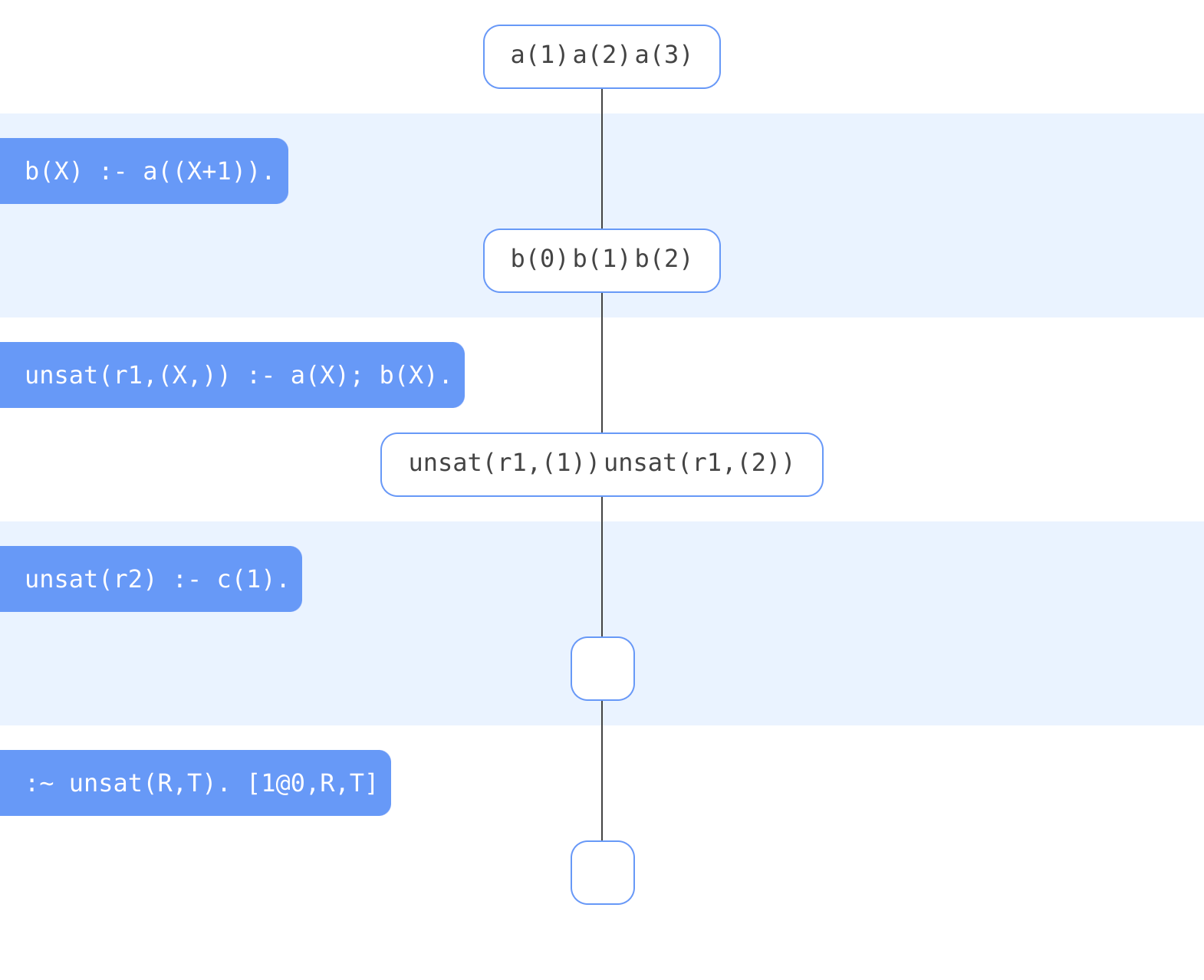
The visualized answer set to this transformed program shows that the original program is unsatisfiable due to the first integrity constraint. It is violated for the variables X=1 or X=2.
By default, variables in the body of integrity constraints are collected in the heads of constraints. The option --no-collect-variables turns off this behavior.
To specify the head name of the weak constraint, use the --head-name option. By default, the head name is unsat, but a different name needs to be specified, if the program already contains the predicate.
$ viasp encoding.lp --head-name _unsat
The relaxer mode only shows one optimal answer set of the transformed program. To change the optimization mode, use the --relaxer-opt-mode option. The optimization mode is one of clingo’s opt mode options.
$ viasp encoding.lp --relaxer-opt-mode=optN
Other options#
If a node can be derived by multiple rules of the program, it is only shown once for the first rule. To show these symbols at every transformation that derives them, use the show-all-derived flag.
To specify the port of the backend, use the --port or -p option.
To specify the port of the frontend, use the --frontend-port or -f option.
To specify the host of both frontend and backend, use the --host and --frontend-host options.
To set the color theme, use the --color option.
For verbose output, use the --verbose option.
In case of a crash or database corruption, the backend can be reset with the --reset option.